
Mobile layout for your existing online store
If your online store is not working properly on mobile or looks like a shrunken copy of the desktop site, I can adapt your current design so that on a phone the text is readable, the buttons are easy to tap and customers can order without zooming in. I change the text, buttons, menu, product pages and the cart. I work with OpenCart, including old versions, and with WordPress (WooCommerce).
First I review your site on a phone and set out in writing what I would change and what it would cost. This is free.
How to tell that a site does not work on phones
Open your shop on your own phone and try to buy something. Your store is not mobile-friendly if you notice any of these:
- you have to pinch and zoom to read the text;
- the page is wider than the screen and you have to scroll sideways;
- buttons and links are too small or too close together, so you tap the wrong one;
- the menu does not open, or it fills the screen and will not close;
- a banner or photo is cut off at the edge of the screen;
- the cart or checkout fields do not fit, and the order button is out of sight.
A customer who struggles to order on a phone may leave. Google also assesses your site mainly by its mobile version, so a poor mobile layout can affect how you show up in search.
What I change: text, buttons, menu, cart
I adapt your current design so that it fits the width of the screen. Only the look changes: your products, orders and page addresses stay the same.
- Text. Large enough to read without zooming, with no lines running off the screen.
- Buttons and links. Bigger and spaced apart, so they are easy to tap with a thumb.
- Menu and search. A long category list goes behind one “Menu” button, and the search field moves to the top.
- Photos and banners. Fitted to the screen instead of cut off. Oversized images are made smaller so pages open faster on a phone.
- Product page. The photo, price and “Add to cart” button are visible straight away, with no sideways scrolling.
- Cart and checkout. Form fields fit the screen, and the phone number field opens a number keypad.
I check the desktop version at the same time, so nothing breaks there.
Mobile layout for an old OpenCart shop
Themes for old OpenCart versions such as 1.5 were often built for desktop screens only. Such a shop can be made to work on phones without upgrading OpenCart itself, which is what I did for e.segris.lt. I change the theme files and styles, while products, orders and the admin panel stay as they are.
After the check, I advise whether it is better to adapt your current theme or switch to another one. If a paid theme is needed, you buy the licence, and we agree on this before work starts.
Upgrading OpenCart to a newer version is a separate job, described on the OpenCart upgrade page.
Example: e.segris.lt before and after
e.segris.lt is a hunting gear shop running on an old OpenCart 1.5 system. On a phone, the old version had a large logo and grey icons without labels at the top, a narrow search field, and banner text cut off at the edge of the screen.
I gave the shop a new look for phones and computers. It now has a compact header, a full-width search field and a “Menu” button, and the text and buttons fit the screen. I also fixed SSL (HTTPS) and added Lithuanian product descriptions with photos and videos.
You can compare the desktop and product page views in the Past work section. It also covers siuvimomanija.lt, a long-term client: an OpenCart shop online since 2010 that I updated. It has automatic shipping cost calculation and card payment, and I worked on its SEO. I have looked after six websites for this client for two years.
Phone
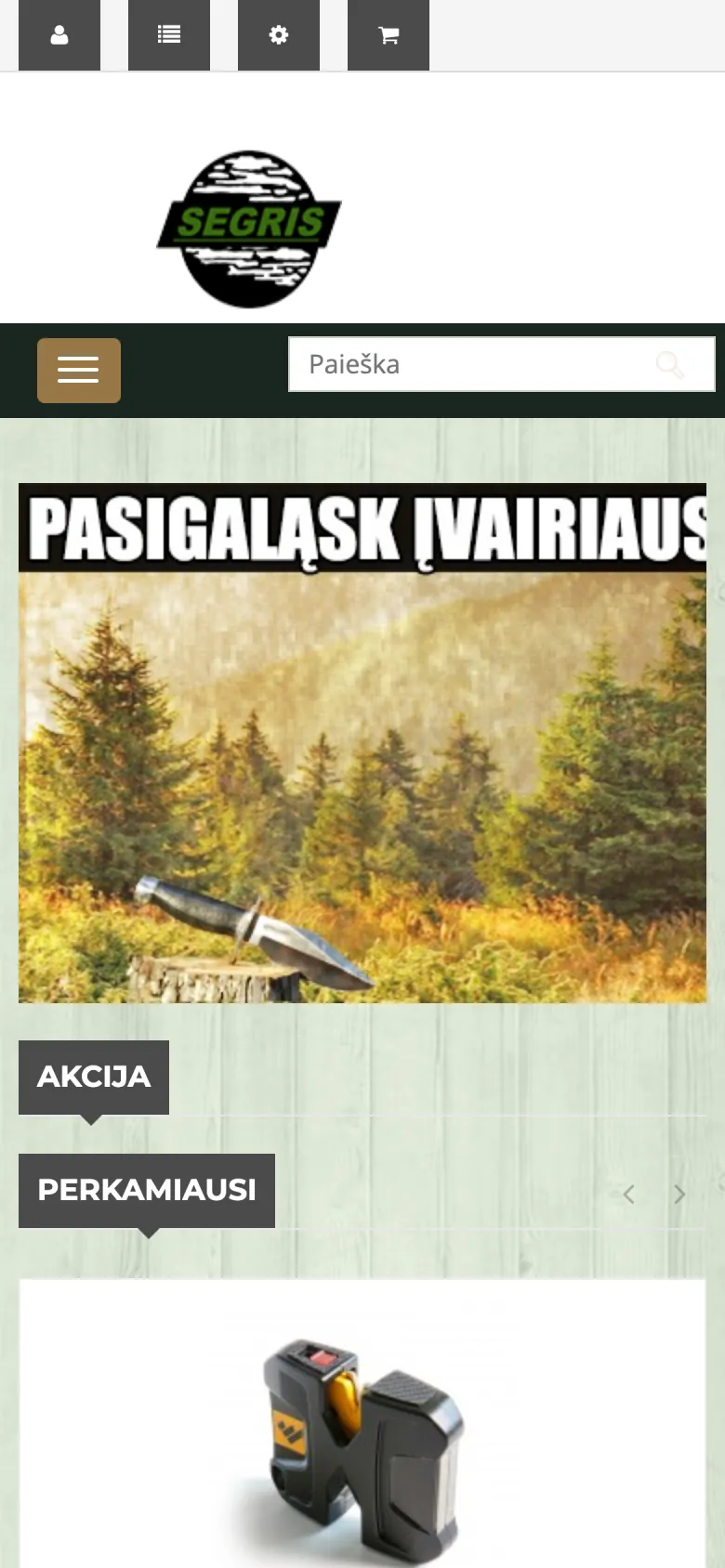
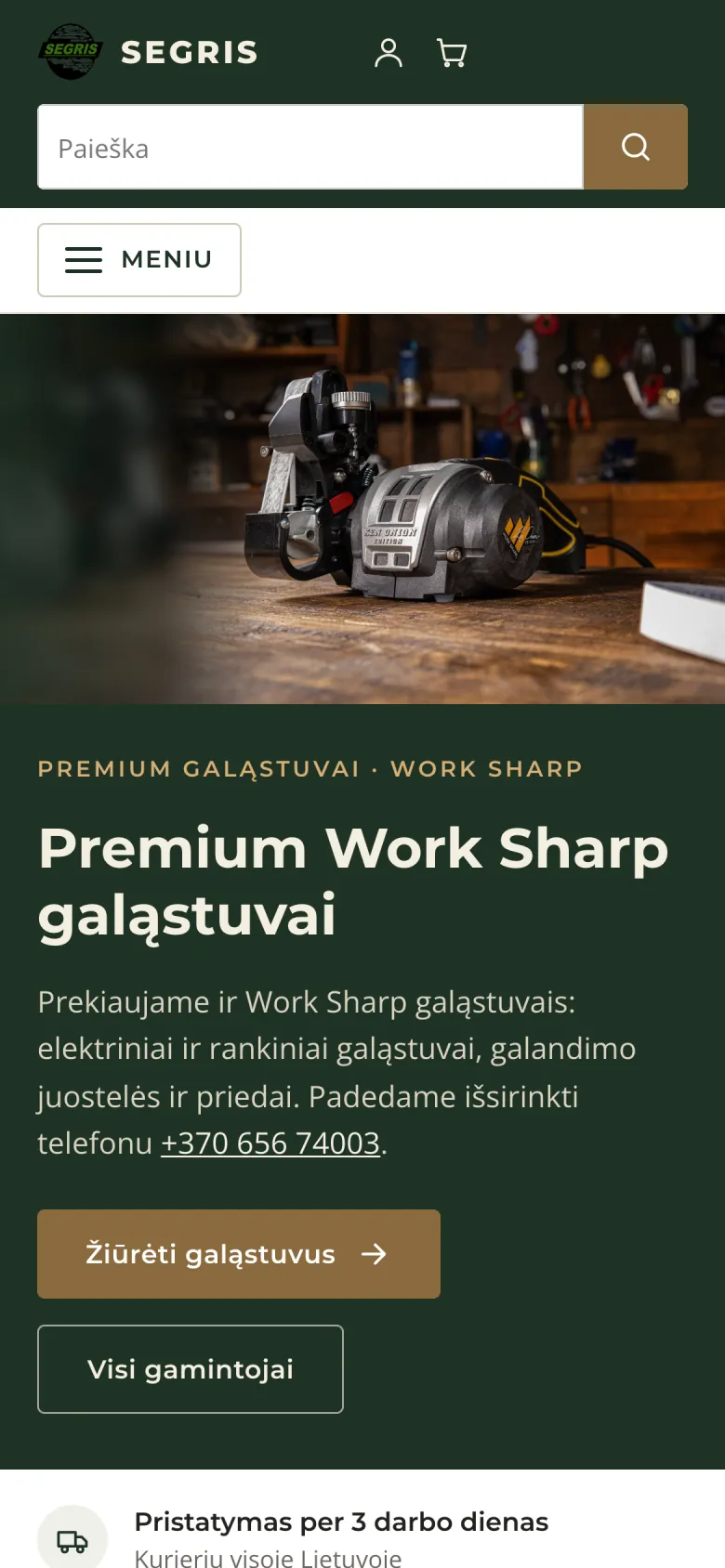
Drag the line to compare.
How I test on phones
I test every change in a test copy while your shop keeps running as usual. I check:
- different screen widths: small and large phones, a tablet and a computer, and a phone turned sideways;
- the whole buying path: home page, category, search, product page, cart and checkout form;
- that no page is wider than the screen and nothing is cut off;
- that text is readable without zooming and buttons are easy to tap;
- how quickly pages open on a phone.
If anything looks wrong, I correct it before moving the changes to your live shop.
How I work safely
- I review your site on a phone and set out in writing what I would change and what it would cost. This is free.
- I make a backup of the whole site and its database.
- I make and test the changes in a test copy. Your shop keeps running meanwhile.
- After checking, I move the changes to your live shop.
The price is agreed before I start, and you pay in instalments. We can issue a VAT invoice. More under How I work.
Questions
How do I make an old online store work on phones?
I adapt your current theme and styles: text, buttons, the menu, product pages and the cart. Products, orders and page addresses stay the same. First I review the site for free and set out in writing what I would change and what it would cost. I test the changes in a test copy, so your shop keeps running.
Do I need a new website to make it mobile-friendly?
Not always. It depends on the system and the design, so I assess this after the check. When an existing site is adapted, its content, products and page addresses stay the same.
How can I test whether my store works on a phone?
Open your store on a phone and try to find a product, add it to the cart and reach the checkout form. If you have to zoom in, scroll sideways or tap a button several times, the store is not mobile-friendly. You can check page speed on mobile with Google’s free PageSpeed Insights tool, or request a free check from me.
Can an old OpenCart theme be made mobile-friendly?
Yes, including old versions, although how much can be changed depends on the theme. I gave e.segris.lt, an old OpenCart 1.5 shop, a new look for phones and computers. After the check, I advise whether to adapt your current theme or switch to another one. If a paid theme is needed, you buy the licence.
Free check
Send me the address of your site. I will review it on a phone and set out in writing what I would change and what it would cost. This is free.
Request a free check